

For merchants and platforms in Thailand
Collect with PromptPay QR, matched automatically
Create a QR per order through the API. Incoming transfers are matched to the right order from the bank's own notification, then a webhook lands in your system. Pay out to Thai bank accounts from the same API.
Thai baht (THB) · business day in Asia/Bangkok · sandbox available before you go live
1You call the API
paid_amount
฿1,000.37
expires_at · 10:40 (+10 min)
- reference_id
- ORD-1001
- bank_code
- 004
- payment_url
- pay.paymenow.asia/p/…
2Your customer sees this
3We call you back
webhook
payment.completed
api.paymenow.asia
X-Environment: production
Core capabilities
- Pay-in
- PromptPay QR
- Pay-out
- Thai bank accounts
- Status updates
- Real-time WebSocket
- Dashboard
- 5 languages
What the platform does
Everything below is shipped and running today — not a roadmap.
PromptPay QR pay-ins
One API call creates a payment. You get the QR payload, a QR image, the exact amount the customer must transfer (paid_amount) and an expiry time.
Automatic matching from bank notifications
Every payment carries a unique satang amount, so an incoming transfer is matched to its order by payer account plus amount — no one has to read slips by hand.
Payouts to Thai bank accounts
Create a payout against your available balance. The amount and its fee are reserved up front, and an insufficient balance is rejected outright.
Real-time updates over WebSocket
The merchant dashboard holds a single WebSocket connection, so pay-ins, payouts and the balance move the moment a status changes.
Merchant dashboard in five languages
Thai, English, Lao, Chinese and Burmese, switchable from the appearance menu — with light and dark mode and a choice of sidebar or top-bar navigation.
Daily reconciliation and an ERP webhook
Pull the transaction report, the daily balance statement and refunds straight from the reports API, or subscribe to the report.daily_summary webhook that fires once a day closes.
HMAC-signed REST API with a sandbox
Every request is signed with HMAC-SHA256 over the method, path and timestamp (plus the body when there is one), and a separate sandbox host lets you test without touching real money.
Withdrawals behind two-factor auth
Moving your balance out through the dashboard requires two-factor authentication and a six-digit one-time code every time.
Staff accounts and IP whitelisting
Give staff their own logins with per-permission access, and restrict API calls to the IP addresses or CIDR ranges you allow.
How it works
Four steps from the customer tapping pay to your back office knowing about it.
Create the payment
Call POST /v1/payments/deposit with the amount, your own reference and the bank details of the person who will transfer the money.
Show the QR
Render qr_code or qr_code_image and show paid_amount — the exact amount to transfer. The payment is valid until expires_at.
The transfer is matched automatically
When the bank reports the incoming money, the payer account and the unique satang amount identify the order and the payment is completed.
Receive the webhook, watch the dashboard
A signed webhook is sent to the webhook_url you supplied, and the dashboard updates immediately over WebSocket.
Two things worth knowing: webhooks are only sent when you supply a webhook_url, and reference_id is not an idempotency key — re-sending one creates a second, independent payment.
Start integrating today
Creating a payment, signature included, in the exact form described in the API reference.
#!/usr/bin/env bash
# Create a PromptPay QR payment and print the response.
API_KEY="pk_demo_xxxxxxxxxxxxxxxxxxxxxxxxxxxxxxxx"
SECRET="sk_demo_xxxxxxxxxxxxxxxxxxxxxxxxxxxxxxxxxxxxxxxxxxxxxxxxxxxxxxxxxxxxxxxx"
BASE="https://sandbox-api.paymenow.asia"
PATH_="/v1/payments/deposit"
TS=$(date +%s)

BODY='{"amount":1000.00,"currency":"THB","reference_id":"ORD-1001","bank_code":"004","bank_account_no":"1234567890","bank_account_name":"Somchai Jaidee","webhook_url":"https://example.com/webhooks/paymenow"}'

SIG=$(printf '%s' "POST|${PATH_}|${TS}|${BODY}" \
  | openssl dgst -sha256 -hmac "$SECRET" -r | cut -d' ' -f1)

curl -sS "${BASE}${PATH_}" \
  -H "X-API-Key: ${API_KEY}" \
  -H "X-Signature: ${SIG}" \
  -H "X-Timestamp: ${TS}" \
  -H "Content-Type: application/json" \
  --data-raw "$BODY"
These samples live in this site's content/samples folder and follow the signing rules in the API reference.
Read the full authentication guideReconcile every day, not at month end
The dashboard's reports are machine-readable: your accounting system or ERP pulls them with the same API key as the payment API.
- Transaction report over any date range, with a summary and pagination
- Daily balance statement, plus the movements behind any single day
- Refunds report
- CSV or Excel download straight from the dashboard
- report.daily_summary webhook delivers yesterday's summary automatically
report.daily_summary
POST https://erp.example.com/hooks
X-Webhook-Event: report.daily_summary
X-Webhook-Signature: a0f17280…32b2

{
  "event": "report.daily_summary",
  "id": "daily_summary:<merchant_id>:2026-09-18",
  "data": {
    "date": "2026-09-18",
    "currency": "THB",
    "opening_balance": 1000.00,
    "credits": 1785.00,
    "debits": 1864.67,
    "closing_balance": 920.33,
    "timezone": "Asia/Bangkok"
  }
}
Every report expresses the net effect on your balance.
Read the Merchant Reports APISecurity and access control
What the platform enforces today.
- HMAC-SHA256 on every request
- Signed with your secret key over the method, the path and the timestamp — plus the body when there is one.
- Timestamp window
- X-Timestamp must be within ±5 minutes of server time, or the request is rejected with TIMESTAMP_EXPIRED.
- IP whitelist
- Restrict API access to given IPs or CIDR ranges. Anything else is rejected with IP_NOT_WHITELISTED even when the signature is valid.
- Two-factor withdrawals
- Withdrawing your merchant balance requires 2FA to be enabled and a one-time code on every request.
- Per-permission staff access
- Grant permissions one at a time: viewing pay-ins, viewing payouts, withdrawing, managing staff, changing settings.
- Verifiable webhook signatures
- Every webhook carries a signature you can verify before acting on it — and your handler should be safe to call twice.
A dashboard your shop floor can actually use
Balance, pay-ins, payouts and reports in one place — with a step-by-step Thai guide for the people who use it daily.
Open the merchant guide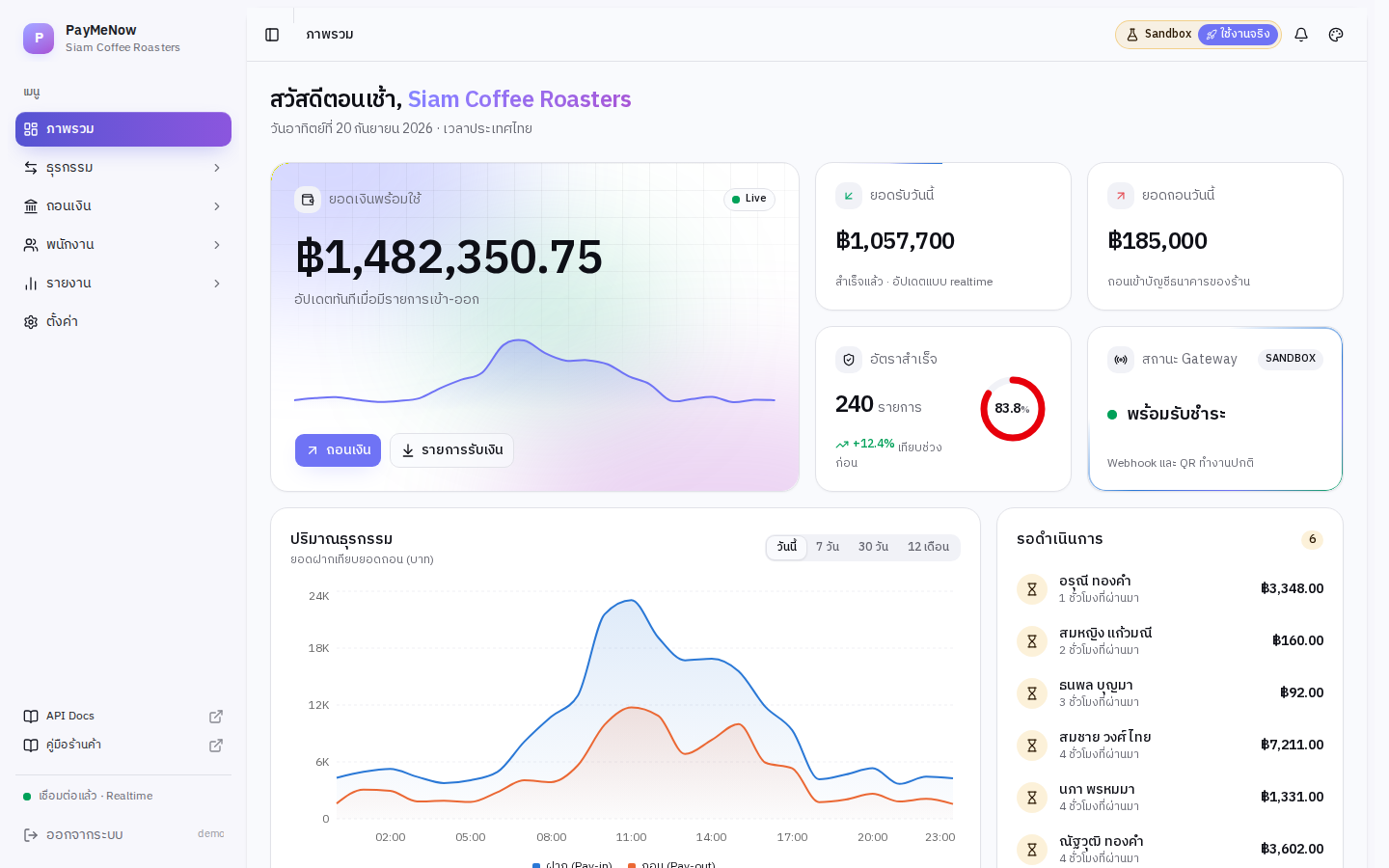
No public price list
Pricing
Fees are set per merchant according to the business and the expected volume, so we do not publish a rate card here.
- Pay-in and pay-out fees agreed per merchant
- Per-transaction minimums and maximums tuned to real usage
- Sandbox access so you can test before committing
By product decision the merchant dashboard does not display per-transaction fee figures; the amounts shown are the net effect on your balance.
Frequently asked questions
Still unanswered? Message the support team on Telegram.
Which payment methods are supported?
Today: PromptPay QR for collecting money and transfers to Thai bank accounts for paying out, in Thai baht (THB) only. Credit cards, debit cards and e-wallets are not supported, and there is no currency conversion.
Can we integrate before going live?
Yes. There is a separate sandbox host and a sandbox key pair. Everything there is simulated and never touches real money; the Sandbox Testing section of the docs lists the test amounts and scenarios.
How does the platform know a customer has paid?
Each payment has an exact amount to transfer (paid_amount) whose satang component is unique, so the bank's incoming-transfer notification can be matched to the order by payer account and amount. The payment is then completed and a webhook is sent to your system.
Which amount should the customer transfer?
Always paid_amount, never the amount you requested. The satang component is what makes matching possible, so a different amount may fail to match.
What if the QR expired but the customer paid anyway?
There is an endpoint for attaching the payment slip to rescue an expired payment, and the dashboard has a screen for reviewing and claiming transfers that did not match.
Can reports feed our accounting system or ERP?
Yes. A separate Merchant Reports API uses the same key and signature as the payment API and exposes transactions, the daily balance statement and refunds, plus a report.daily_summary webhook that pushes each finished day.
How much does it cost?
There is no public price list. Rates depend on the business and the volume, so please request a quote.
Ready to start?
Send us your business details and the team will come back with onboarding information and sandbox credentials.